

Prove a Monero payment
Sometimes you need to prove that you sent a Monero payment — for example, to show a merchant or exchange that your transaction really reached their address. Because Monero is private, a payment can't be checked from the blockchain alone, but Monero gives you a way to prove a specific payment to a specific recipient.
Cake Wallet shows you everything you need, and Cake's own Monero block explorer can verify it.
You'll share three things with whoever needs to verify the payment: the transaction ID, the recipient's address, and the secret transaction key. The transaction key only reveals this one payment — it does not give access to your wallet or funds.
Before you start: two things have to already be true. The transaction key and the recipient address are not stored on the blockchain. They are saved only on the device that sent the payment, at the moment you sent it, so they cannot be recovered afterwards.
"Save recipient address" must have been on when you sent. The Recipient addresses row only appears when the privacy setting
Save recipient address(gear icon →Wallet settings→Privacy) was enabled at the time the transaction was sent. This setting is on by default, but if you have switched it off you will not be able to prove payments.A restored or rescanned wallet won't have these values. Because both are stored locally, a wallet restored from your seed on another device has no saved transaction keys or recipient addresses. A rescan also clears them — see Why are my funds not appearing?
If either applies, the rows below will be missing or empty, and this payment can no longer be proven this way.
Find the details in Cake Wallet
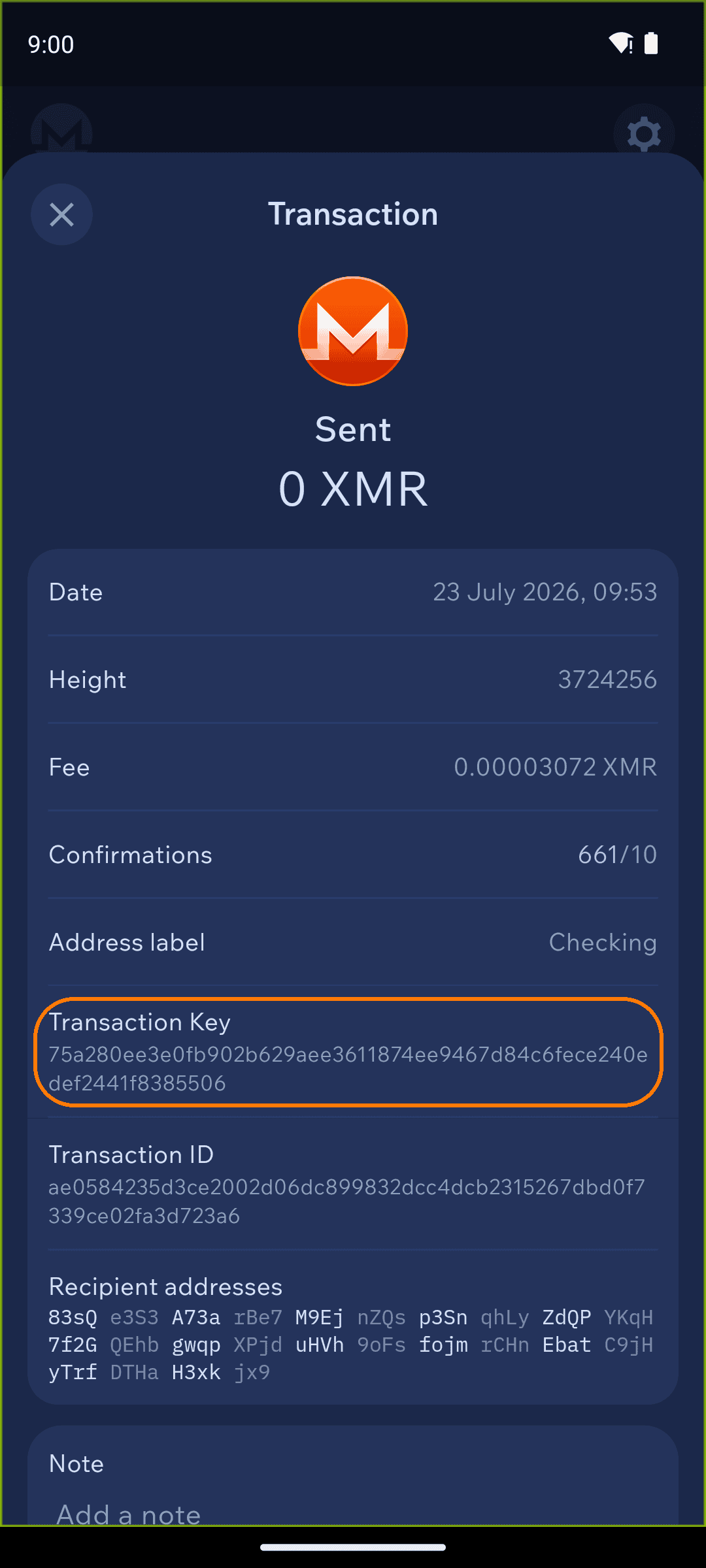
Open your Monero wallet and tap the sent transaction in your history to open its details. You'll need three values from this screen:
Transaction ID
Recipient address (under "Recipient addresses")
Transaction Key
Tap any value to copy it.
Verify on the Monero explorer
Go to explorer.monero.com and choose "I sent Monero." On the Get a transaction receipt page, fill in:
Transaction ID
Recipient address
Secret transaction key — this is the Transaction Key from Cake Wallet
Then tap Get receipt. The explorer confirms the amount that was sent to that address in that transaction — a receipt you can share as proof of payment.
Only share the transaction key with people you want to be able to see this payment. Anyone with these three values can see the amount you sent to that address (but nothing else about your wallet).
The explorer also has an "I received Monero" option for proving a payment you received — choose it instead and follow the on-screen prompts.
Last updated